
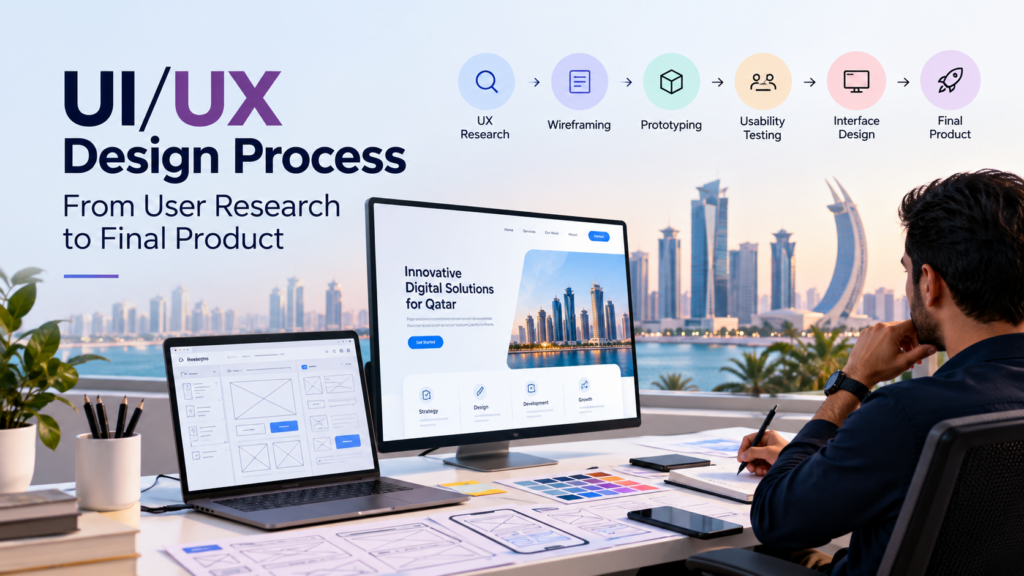
A successful digital product starts long before the first polished screen appears. The UI/UX design process turns business goals, user needs, and product requirements into a digital experience that people can understand, navigate, and use.
For businesses in Qatar, effective UX matters across websites, mobile apps, SaaS platforms, e-commerce stores, financial products, healthcare services, and digital platforms. A structured design process helps teams reduce assumptions, identify usability problems early, and create experiences that support both customers and business objectives.
But what does a professional UI/UX design process actually involve?
From user research and information architecture to wireframing, interface design, prototyping, testing, and development handoff, each stage has a specific purpose.
What Is the UI/UX Design Process?
The UI/UX design process is a structured approach to designing digital products around user needs and business goals.
UX, or user experience design, focuses on how a product works and how users move through it. UI, or user interface design, focuses on the visual and interactive layer of that experience.
The two disciplines work together. UX research helps teams understand users. Information architecture organises content and features. User flows define how people complete tasks. Wireframes establish structure. UI design creates the visual interface. Prototypes make concepts interactive, while usability testing reveals problems before development.
A typical UI/UX design process includes:
- User research and discovery
- Problem definition and goal setting
- Information architecture and user flows
- Wireframing
- UI and interface design
- Prototyping
- Usability testing
- Development handoff and iteration
The exact workflow can change according to the product, industry, users, and project scope. The central principle remains consistent: understand the problem before designing the solution.
Why Is the UI/UX Design Process Important?
A structured design process gives businesses a clearer path from an initial idea to a usable digital product.
It helps teams:
- Understand user expectations
- Identify pain points
- Organise complex information
- Simplify customer journeys
- Validate ideas before development
- Reduce expensive redesigns
- Improve usability and accessibility
- Support conversion goals
- Create consistent interfaces
- Build scalable digital products
UX also connects design decisions to business objectives. A checkout experience, for example, should not only look attractive. It should help customers find products, understand pricing, complete payment, and finish their purchase with minimal friction.
8 Steps of the UI/UX Design Process
Step 1: Conduct UX Research
Every effective UI/UX design process starts with understanding the people who will use the product.
UX research helps designers identify user goals, behaviours, expectations, frustrations, and barriers. It also gives businesses evidence that can guide design decisions.
Research can include:
- User interviews
- Surveys
- Customer feedback
- Competitor analysis
- Website or app analytics
- Stakeholder interviews
- User journey analysis
- Usability reviews
For example, an e-commerce business may discover that customers struggle to find products because categories are unclear. A healthcare platform may find that patients have difficulty locating appointment information.
Research turns assumptions into evidence.
What Is the Output of UX Research?
Research can produce:
- User personas
- User needs
- Pain points
- Customer journeys
- Behaviour patterns
- Business requirements
- Research findings
- Design opportunities
For Qatar businesses, research can also consider language, cultural expectations, device usage, accessibility, and the needs of Arabic and English-speaking audiences.
Step 2: Define the Problem and User Goals
Research produces information. The next stage turns that information into clear priorities.
Designers identify the most important problems and define what the product needs to accomplish.
Teams may establish:
- Primary user goals
- Business objectives
- User journeys
- Functional requirements
- Conversion goals
- Success criteria
- Key product requirements
A clear problem statement keeps the project focused.
For example, an online retailer may discover that users abandon the purchasing journey because product discovery is difficult. The design objective could then focus on improving navigation, search, filtering, and product discovery.
Good UX design does not begin by asking, “What should the screen look like?”
It begins by asking, “What problem are we solving?”
Step 3: Build Information Architecture and User Flows
Once the problem is clear, designers organise the experience.
Information architecture defines how pages, content, features, and navigation are structured. User flows show the steps users take to complete important tasks.
A simple e-commerce journey could look like:
Homepage → Product Category → Product Page → Cart → Checkout → Confirmation
A SaaS platform may require separate flows for:
- Account creation
- Onboarding
- Dashboard access
- Payments
- Reporting
- Account management
- Customer support
Good information architecture makes important information easier to find. Clear user flows reduce unnecessary steps and help users reach their goals efficiently.
This stage creates the structural foundation for the interface.
Step 4: Create Wireframes
Wireframing turns the product structure into visual layouts.
A wireframe is a simplified representation of a webpage, app screen, or digital interface. It focuses on structure and functionality rather than final colours, imagery, or decorative elements.
Wireframes can define:
- Navigation
- Content hierarchy
- Page structure
- Buttons and calls to action
- Forms
- Search
- Product sections
- Interaction points
Designers often begin with low-fidelity wireframes before moving toward more detailed layouts.
This approach makes structural changes easier to manage. A navigation problem discovered during wireframing can be resolved before significant time is invested in visual design.
Wireframes therefore act as a bridge between strategy and interface design.
Step 5: Develop the UI and Interface Design
Once the structure is validated, designers develop the visual interface.
UI design gives the product its visual identity while supporting usability and interaction.
UI designers may work on:
- Colour systems
- Typography
- Buttons
- Forms
- Cards
- Icons
- Images
- Spacing
- Navigation
- Responsive layouts
- Components
- Design systems
The goal is not simply to make a product look attractive.
Every visual decision should help users understand information, recognise interactive elements, and complete tasks.
UX Design vs UI Design
UX and UI work together, but they solve different problems.
| UX Design | UI Design |
|---|---|
| User research | Colour |
| User journeys | Typography |
| User flows | Buttons |
| Information architecture | Components |
| Wireframes | Visual hierarchy |
| Usability | Icons |
| Prototyping | Design systems |
UX establishes how the experience works. UI establishes how that experience looks and behaves at the interface level.
For Qatar businesses serving Arabic and English audiences, UI design may also require careful consideration of right-to-left layouts, typography, content direction, responsive behaviour, and multilingual interfaces.
Step 6: Build an Interactive Prototype
A prototype turns static screens into an interactive experience.
Users and stakeholders can click through important journeys before development begins.
A prototype can demonstrate:
- Navigation
- Menus
- Buttons
- Forms
- Page transitions
- Checkout flows
- Onboarding
- Micro-interactions
Prototyping creates a shared reference for designers, developers, stakeholders, and business owners.
Instead of discussing how a product might work, teams can interact with a realistic representation of the proposed experience.
This makes it easier to identify usability problems before development resources are committed.
Step 7: Conduct Usability Testing
A design can make perfect sense to its creators and still confuse real users.
Usability testing helps identify that gap.
Test participants complete realistic tasks while designers observe where they hesitate, misunderstand information, make errors, or struggle to complete an action.
Testing can answer questions such as:
- Can users find the information they need?
- Do users understand the navigation?
- Can they complete important tasks?
- Are calls to action clear?
- Where do users encounter friction?
- Which interface elements create confusion?
- How long does it take to complete a task?
Useful UX metrics can include:
- Task completion rate
- Time on task
- Error rate
- User drop-off
- Conversion rate
- User satisfaction
The findings then feed back into the design.
Test → Identify → Improve → Test again
That feedback loop is one of the most important principles in modern UX design.
Step 8: Prepare the Design for Development
A strong UI/UX process does not end when the design looks finished.
The final stage connects design and development.
Designers prepare the approved screens, components, interactions, assets, and specifications required to build the product accurately.
A professional development handoff may include:
- Final UI screens
- Responsive layouts
- Design system components
- Typography specifications
- Colour specifications
- Interaction behaviour
- Image assets
- Component states
- Developer notes
- Prototype links
A clear handoff reduces ambiguity between designers and developers.
The development team can then implement the approved experience using defined components and interaction rules.
What Are the Main UX Design Deliverables?
A professional UX project can produce several deliverables throughout the process.
Common examples include:
Research deliverables
- User research findings
- Personas
- Customer journey maps
- Pain-point analysis
Planning deliverables
- User flows
- Information architecture
- Product requirements
Design deliverables
- Wireframes
- UI designs
- Design systems
- Responsive layouts
Validation deliverables
- Interactive prototypes
- Usability testing findings
- Design recommendations
Development deliverables
- Final design files
- Components
- Specifications
- Assets
- Developer handoff documentation
The exact deliverables depend on the product and project scope.
How Does Lean UX Fit Into the Design Process?
Traditional design processes often followed a linear sequence. Teams completed one stage before moving to the next.
Modern digital products require greater flexibility.
Lean UX uses an iterative approach where teams research, design, test, learn, and improve continuously.
A simplified Lean UX cycle looks like:
Research → Design → Prototype → Test → Learn → Improve
The process can repeat throughout product development.
This approach is particularly useful for websites, SaaS platforms, mobile apps, and products that receive frequent updates.
Instead of treating launch as the end of design, teams use real user feedback and product data to guide continuous improvements.
Common UI/UX Design Mistakes to Avoid
A strong process becomes less effective when important stages are skipped.
Designing Before Research
Starting with colours and layouts before understanding users can result in a visually polished product that solves the wrong problem.
Skipping Information Architecture
Poor content structure can make even a visually attractive website difficult to navigate.
Jumping Straight to High-Fidelity Design
Detailed screens take more time to change. Wireframes allow teams to resolve structural issues earlier.
Ignoring Mobile Users
Responsive behaviour should be considered from the beginning, especially when customers access products across multiple devices.
Treating UI as the Entire Experience
UX involves much more than visual appearance. Navigation, content, accessibility, interactions, information architecture, and task completion all contribute to the experience.
Skipping Usability Testing
Internal approval does not replace feedback from real users.
Treating Launch as the End
Digital products change after launch. Analytics, feedback, support requests, and user behaviour can reveal new opportunities for optimisation.
How Long Does the UI/UX Design Process Take?
There is no universal timeline for UI/UX design.
A small website redesign may take a few weeks, while a complex mobile application, SaaS platform, or enterprise system may require several months.
The timeline depends on:
- Product complexity
- Number of screens
- Research requirements
- Number of user journeys
- Stakeholder feedback
- Testing requirements
- Design system requirements
- Development scope
A clear process is more valuable than an arbitrary deadline.
Each stage should provide enough information to make the next design decision with confidence.
Why UI/UX Design Matters for Businesses in Qatar
Digital experiences increasingly shape how customers interact with businesses.
A website or application may become the first point of contact between a customer and a company. Poor navigation, unclear information, complicated forms, or difficult checkout journeys can create friction before a customer ever speaks to a sales representative.
A structured UI/UX design process can help Qatar businesses:
- Improve digital customer journeys
- Simplify complex services
- Make information easier to find
- Support Arabic and English experiences
- Improve mobile usability
- Validate product ideas
- Reduce unnecessary redesign
- Support conversion objectives
- Create scalable digital products
The right approach also depends on the industry.
A healthcare platform may prioritise accessibility and appointment journeys. An e-commerce business may focus on product discovery and checkout. A SaaS company may prioritise onboarding, navigation, and feature adoption.
The design process should therefore reflect the users, product, and business model rather than follow a rigid template.
How Can Professional UI/UX Design Improve a Digital Product?
Professional UI/UX design connects user needs with business objectives.
A strong process can help identify problems before development, validate ideas through prototypes, and use user feedback to improve the final experience.
The result is not simply a better-looking interface.
It is a digital product that is easier to understand, easier to navigate, and better aligned with the people who use it.
For businesses planning a website, mobile application, SaaS platform, or digital service, professional UI/UX design services can provide the research, strategy, design, prototyping, and testing needed to build a more effective digital experience.
Frequently Asked Questions
What is the UI/UX design process?
The UI/UX design process is a structured workflow for creating digital products around user needs and business objectives. It typically includes research, problem definition, information architecture, wireframing, UI design, prototyping, usability testing, and development handoff.
What are the main steps in UX design?
The main UX design steps include research, defining user needs, creating information architecture and user flows, wireframing, prototyping, usability testing, and continuous improvement.
What is the difference between UX and UI design?
UX design focuses on how a digital product works and how users complete tasks. UI design focuses on the visual and interactive elements of the interface. Both disciplines work together to create a complete digital experience.
Why is UX research important?
UX research helps teams understand users, their goals, behaviours, and pain points. It provides evidence that can guide design decisions instead of relying only on assumptions.
What is the difference between wireframing and prototyping?
Wireframing focuses on the structure and layout of a digital product. Prototyping adds interactions so teams can experience and test how the product works before development.
Why is usability testing important?
Usability testing reveals where real users experience confusion, errors, or friction. Designers can use those findings to improve the product before and after launch.
How long does UI/UX design take?
The timeline depends on product complexity, research requirements, number of screens, user journeys, stakeholder feedback, testing, and development requirements. Small projects may take weeks, while complex products can require several months.
Can UI/UX design improve a business website?
Yes. A structured UI/UX process can improve navigation, information organisation, accessibility, task completion, mobile usability, and overall customer experience. The impact depends on the users, product, and business objectives.
Build a Better Digital Experience
Great digital products are rarely created by jumping straight into visual design.
The strongest results come from understanding users, defining the right problems, organising the experience, testing ideas, and continuously improving the final product.
For businesses in Qatar, a thoughtful UI/UX design process can turn complex requirements into digital experiences that are easier to use and better aligned with customer and business goals.